
Agents 2026 Rank: #2874
Cisco AI Canvas ✓
The workspace for AgenticOps
Verdict
A quick read before you dig into the full page.
- Best if
- The workspace for AgenticOps
- Skip if
- Limited to Cisco environments
- Pick this when
- Merges cross-domain IT telemetry
Considering Younet instead? Compare side by side
Overview
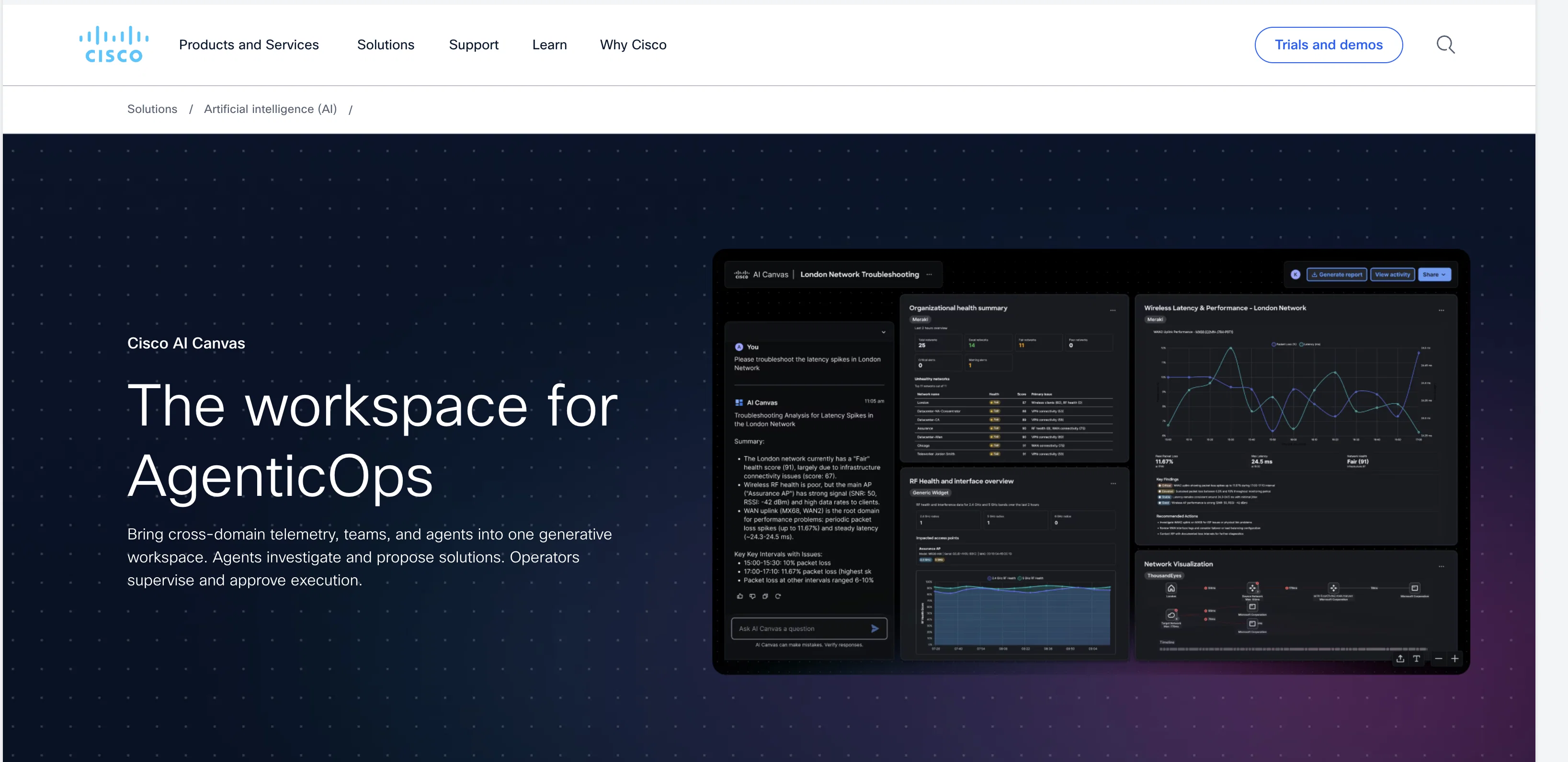
AI Canvas is a workspace tool that merges cross-domain IT telemetry, teams, and agents into one generative platform. It is designed to improve efficiency and coordination among teams by consolidating multiple domains and tools in a single workspace.
A significant feature of the tool is its ability to maintain context across operations and systems. Users can launch AI Canvas from other platforms such as Meraki, Splunk, or Cisco Cloud Control.Agents use the Model Context Protocol to query connected tools and retrieve only necessary telemetry, thus minimizing operational silos.
AI Canvas allows teams to pin telemetry, timelines, and artifacts, facilitating evidence preservation. Another feature worth noting is the tool's collaboration capacity, which allows workspace sharing among teams without screen sharing.AI Canvas employs a human-in-the-loop methodology, where agents investigate and propose solutions while humans approve the execution.
From a single prompt, AI Canvas can generate a task-focused view with sources attached, making the decision-making process more straightforward. The tool also presents related signals to narrow down the scope of the operation, leading to faster problem identification and resolution.
AI Canvas supports agents in executing approved workflows and capturing changes and outcomes. Additionally, the workspace acts as a record of evidence, decisions, approvals, and outcomes, making it possible to reuse successful operational patterns over time.AI Canvas is based on the Cisco Deep Network Model and enables users to pull relevant telemetry and context across Cisco domains.
It is also extendable to third-party products over time. It aids in curating a unified view of converged and hyperconverged infrastructure among various Cisco products.
Access & connections
Where you can use Cisco AI Canvas.
Platforms
Capabilities
What this tool accepts, produces, and is strongest at.
Input
- Text
Output
- Text
Highlights
- Agents
Supported features
- Agents
- Assistant
- Automation
- Cybersecurity
- Integrations
- Memory
- Team Collaboration
Pros & cons
Pros
- Merges cross-domain IT telemetry
- Improves team efficiency
- Consolidates multiple domains
- Maintains context across operations
- Launchable from other platforms
- Minimizes operational silos
- Facilitates evidence preservation
- Offers workspace sharing
Show 32 more
- Human-in-the-loop methodology
- Generates task-focused views
- Aids decision-making
- Presents related signals
- Supports workflow execution
- Records evidence and outcomes
- Enables reuse of operational patterns
- Based on Cisco Deep Network Model
- Extendable to third-party products
- Unifies view of infrastructures
- Evidence-based problem resolution
- Promotes team coordination
- Simplifies operational tasks
- Remediates faster with approval-gated execution
- Preserves model context protocol
- Cuts down problem identification time
- Enables operational pattern reuse
- Curates unified view
- Connected team dashboards
- Natural language querying
- Pinable telemetry and timelines
- Reduces repetitious work
- Shared evidence visualization
- Agent-led investigation and recommendations
- Validated task outcomes
- Telemetry pull across Cisco domains
- Converged infrastructure monitoring
- Shares workspace without screen sharing
- Operator-supervised executions
- Context-based signal narrowing
- Pulls cross-domain telemetry
- Preserves evidence through tool switching
Cons
- Limited to Cisco environments
- Dependent on Model Context Protocol
- Operational silos still present
- Third-party product integration overtime
- Human approval required for execution
- Necessity to pin telemetry manually
- Screen sharing not possible
- Reusability of operational patterns unclear
Show 2 more
- High reliance on human-in-the-loop methodology
- Possible redundancy with existing tools
Compare alternatives
Similar tools in the catalog — with a clear reason to open each one.

Younet ✓
Free TrialAI Agent Orchestration and Automation. Build your agentic business.
Why look Offers a public API
Full comparison
Agents by Athena AI ✓
Free TrialCreate AI agents for any task
Why look Offers a public API
Full comparison
Rumora ✓
PaidAI agents will find and mention your brand in viral videos comments
Why look Higher community rating
Full comparison
Watermelon ✓
FreemiumHandle up to 96% of your support automatically
Why look Offers a public API
Full comparison

ChatNode ✓
Free TrialAI Agents for customer service that feel human
Why look Offers a public API
Full comparisonReleases 1
FAQ 12
What is Cisco AI Canvas?
How does Cisco AI Canvas improve efficiency among teams?
How does Cisco AI Canvas maintain context across operations?
Can I launch Cisco AI Canvas from platforms like Meraki, Splunk, or Cisco Cloud Control?
What is the Model Context Protocol used by agents in AI Canvas?
What does it mean to pin telemetry, timelines, and artifacts in AI Canvas?
How does workspace sharing work in AI Canvas?
What is the human-in-the-loop methodology used by AI Canvas?
How does AI Canvas assist in decision-making?
How does AI Canvas help in problem identification and resolution?
How does AI Canvas support agents in executing workflows?
What does the record of evidence in AI Canvas consist of?
Related tools
Recommended

MagicSlides.app AI PPT Maker ✓
FreemiumCreate Stunning PPTs in Seconds with the AI PPT Maker

GetLogit ✓
FreemiumArtificial intelligence, available for everyone.

ChatGPT ✓
FreemiumAsk anything, create anything, and move from idea to action.

Automateed ✓
Free TrialCreate eBooks effortlessly with Automateed, the AI-powered writing tool.

Kin - Personal AI Advisors ✓
FreePrivacy-first & designed your for mind, and life at work

Aiter.io | Paste a URL. Ship a Campaign That Sounds L... ✓
FreemiumAI marketing that sounds like you, not everyone else.